Last updated September 2026

Make to n8n Migration

For teams that need self-hosting Make doesn't offer, or have grown past the point where per-operation billing makes sense -- migrating the scenarios that actually justify it, without breaking what's already running.

Quick answer: Most Make-to-n8n migrations come down to one of two reasons: needing self-hosted infrastructure for compliance or data residency, or running enough volume that n8n's execution-based pricing beats Make's per-operation billing. There's no direct converter -- each scenario has to be rebuilt -- so a phased migration, moving the highest-value scenarios first, is the lower-risk path.

Is This Migration Right for You Yet?

We'd rather tell you honestly than push a migration you don't need yet.

Worth migrating if
  • Data residency or compliance now requires automation to run entirely on your own infrastructure
  • You're running enough volume that Make's per-operation billing has become a real, visible cost
  • You need workflow complexity or custom logic that's easier to build and maintain in n8n's node-based canvas
  • You have some technical capacity in-house, or are bringing in help for it
Not worth it yet if
  • Make is already handling your volume comfortably within cost expectations
  • Nobody can maintain a self-hosted tool, and you don't want that ongoing dependency
  • You rely on a Make-specific integration with no clean API path in n8n

What actually changes in the migration itself

Make's visual scenario builder is conceptually closer to n8n's node-based canvas than Zapier's linear structure is -- but there's still no direct import. Each scenario's modules, filters, and routing logic get rebuilt as n8n nodes, one workflow at a time. The business process doesn't change; the implementation does. An audit of your active scenarios comes first, so migration effort goes where it actually pays off.

How a Phased Migration Actually Works
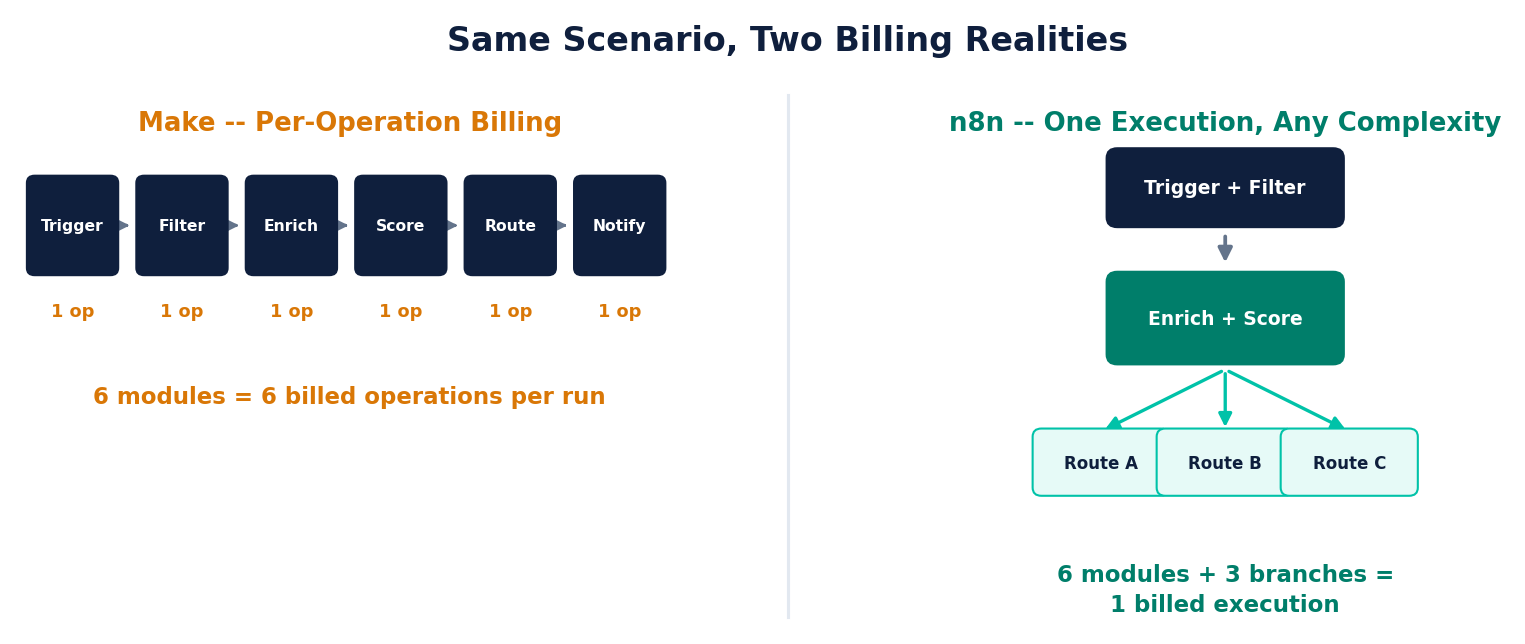
Same scenario shown two ways -- Make's per-operation billing versus n8n's branching structure billed as one execution
1
Audit your active Make scenarios
Ranked by execution volume, cost, and compliance sensitivity -- so the scenarios that actually justify migrating get prioritized first.
2
Rebuild the highest-priority scenarios first
Your highest-volume or most compliance-sensitive scenarios get rebuilt in n8n and run in parallel with the original Make version, not replacing it yet.
3
Cut over once the n8n version is verified
Only once the n8n workflow has run correctly in parallel do we switch the Make scenario off -- nothing goes dark mid-migration.
4
Repeat for the next tier, leave the rest on Make if it makes sense
Low-volume or Make-specific scenarios often aren't worth migrating at all -- a good migration plan says so explicitly, rather than moving everything for the sake of it.
Not sure if the switch is worth it for your volume? Our n8n vs Zapier vs Make comparison breaks down exactly where the pricing gap starts to matter.

Every migration starts with the same process we use for everything — audit first, then build what the audit actually finds, not the other way around.

Frequently Asked Questions

Why would a team migrate from Make to n8n?

The two most common reasons: needing to self-host for data residency or compliance (Make doesn't offer this), or running enough volume that n8n's execution-based pricing becomes meaningfully cheaper than Make's per-operation billing.

Can Make scenarios be automatically converted to n8n workflows?

No -- there's no direct converter between the two. Each Make scenario's modules and logic have to be rebuilt as n8n nodes. The underlying business process stays the same; only the implementation changes.

Is migrating from Make harder than migrating from Zapier?

Generally similar in effort -- both require rebuilding workflow logic from scratch. Make's visual scenario builder is closer in structure to n8n's node-based canvas than Zapier's linear Zaps are, which can make the conceptual mapping slightly more direct, though the actual build work is comparable.

Do we need to migrate everything at once?

No. A phased approach -- migrating your highest-volume or most compliance-sensitive scenarios first while the rest keep running on Make -- is the lower-risk path, and lets you validate n8n before committing fully.

Not sure if migrating is worth it yet?

That's exactly what a Discovery Call is for — an honest look at your actual Make usage before we recommend anything.

Tell us about your business →
We use cookies to understand how visitors use this site. Analytics cookies stay off unless you say yes — see our Cookie Policy for details.

Cookie Preferences

Strictly Necessary
Required for the site to function. Always on, cannot be disabled.
Analytics
Helps us understand how visitors use the site (Google Analytics). Off by default.