Home / Case Studies / AI Lead Scoring in Zapier
AI Marketing Automation case study

We built AI lead scoring in Zapier, then tried to break it

A 15-step workflow that scores every inbound enquiry out of 100, with rules plus AI, and tells sales which leads to call first. Then we tested it until it broke, and fixed what we found.

Platform
Zapier + AI by Zapier
Workflow
15 steps, 3 routing paths
Status
Tested across HOT, WARM and COLD leads

A real internal test run. Contact details are hidden.

At a glance

What we built
A Zapier workflow that scores each enquiry out of 100 (65 points from rules, 35 from AI reading the message) and routes it HOT, WARM or COLD.
What happened in testing
Three test leads scored 85, 68 and 24, and each took the right path, about 30 seconds after pickup.
What broke
Two silent bugs, both caught by checking the data written back. The same lead run twice scored 68 then 69, and stayed WARM.
Where it stands
Tested end to end on test enquiries. Not yet measured on real lead volume.

What is AI lead scoring?

AI lead scoring, sometimes called AI lead qualification, uses a language model to read the unstructured parts of an enquiry, such as the problem a prospect describes in their own words, and turn them into a consistent, comparable score.

In this workflow AI does one bounded job: it scores the intent behind the written message, worth up to 35 of 100 points. Everything a form can capture as a fixed answer is scored by rules. That split keeps the result predictable, cheap to run and easy to explain to a sales team.

Every enquiry carries signals. Reading them by hand doesn’t scale.

A single website enquiry already tells you a lot: what the prospect wants, whether they are ready to automate, what they can spend, and how clearly they understand their own problem.

The trouble is that half of those signals sit in dropdowns and half sit in a free-text box. Someone has to read each enquiry, weigh it against the others and decide where it ranks. Different people weigh the same enquiry differently, and a strong lead can wait in the queue behind weaker ones.

Which leads deserve attention first, and why?

  • Service requestedDropdown
  • Automation interestDropdown
  • Budget rangeDropdown
  • Business problemFree text
  • UrgencyFree text
  • SpecificityFree text

Dropdown answers can be scored with rules. Free-text signals need interpretation.

The approach: deterministic rules plus AI reasoning

We split qualification along the line between structured and unstructured data. Rules handle what has a known answer. AI handles what needs reading.

Rule-based scoring

Lookup tables in Formatter by Zapier convert each dropdown answer into points.

65 points
  • Service relevance (25)
  • Automation interest (15)
  • Budget (25)

AI intent analysis

AI by Zapier reads the prospect’s written problem and scores it against a fixed five-part rubric.

35 points
  • Clarity, impact, solution intent
  • Urgency and specificity
  • Evidence from the message only
Final lead score out of 100
HOT 80–100WARM 50–79COLD 0–49

How the workflow runs

Seven stages, fifteen Zapier steps. Nobody touches the lead between the form submission and the prioritised record.

  1. Capture

    A prospect submits the website form.

    Step 1 · Netlify
  2. Record

    The lead is written to the lead database.

    Step 2 · Google Sheets
  3. Score signals

    Service, interest and budget are scored by lookup.

    Steps 3–6 · Formatter
  4. Analyse intent

    AI scores the written problem out of 35.

    Step 7 · AI by Zapier
  5. Total

    All four scores are summed to /100.

    Step 8 · Formatter
  6. Route

    The score picks the HOT, WARM or COLD path.

    Steps 9, 10, 12, 14 · Paths
  7. Update

    Score and priority are written back to the record.

    Steps 11, 13, 15 · Sheets
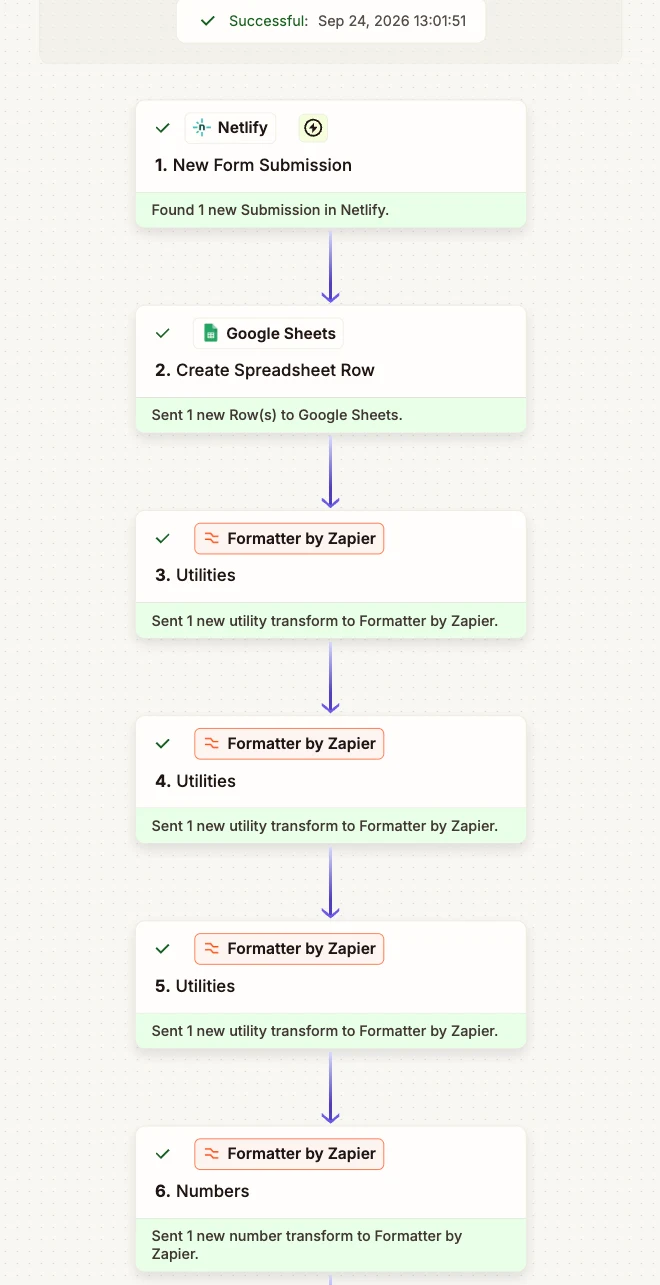
Steps 1–6Capture and rule scoring
Zapier run history showing steps 1 to 6 completed successfully: Netlify form submission, Google Sheets row created, and four Formatter by Zapier scoring steps
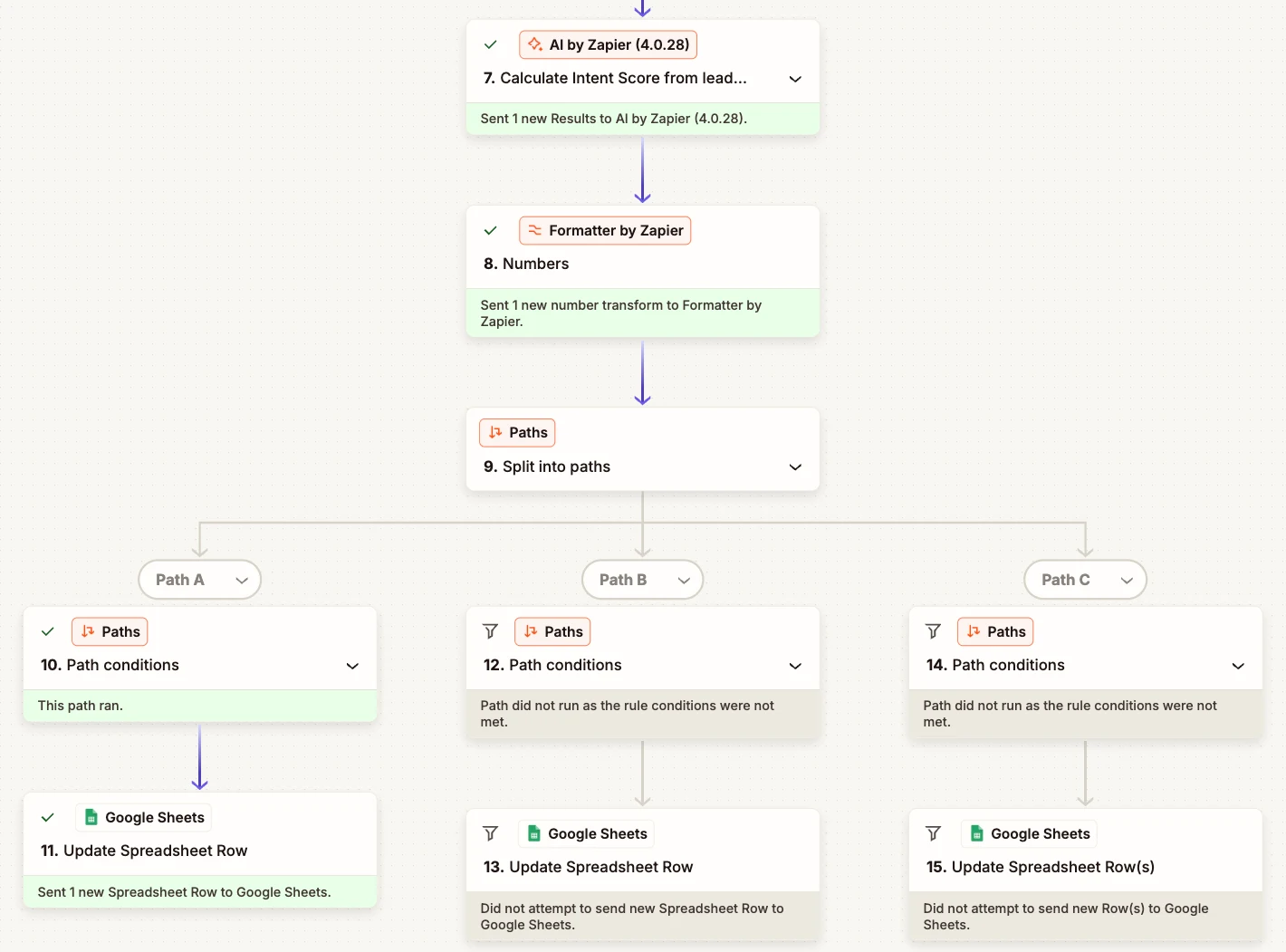
Steps 7–15AI analysis, total and routing
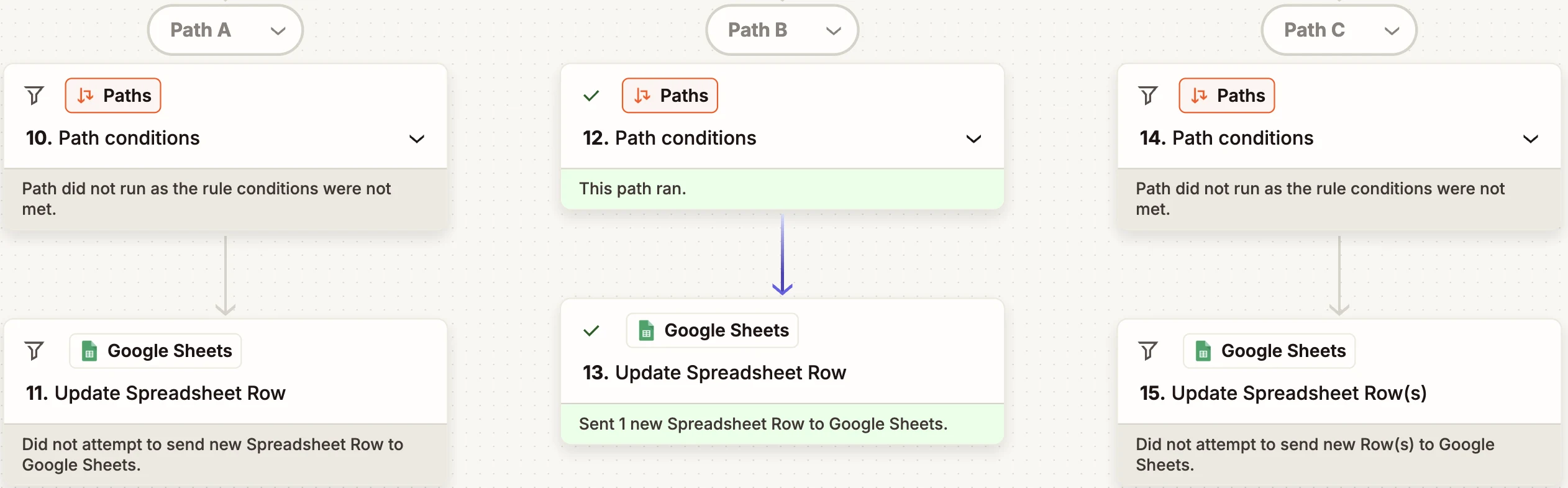
Zapier run history showing AI by Zapier calculating the intent score, the final score calculation, and Paths routing the lead down Path A while Paths B and C did not run
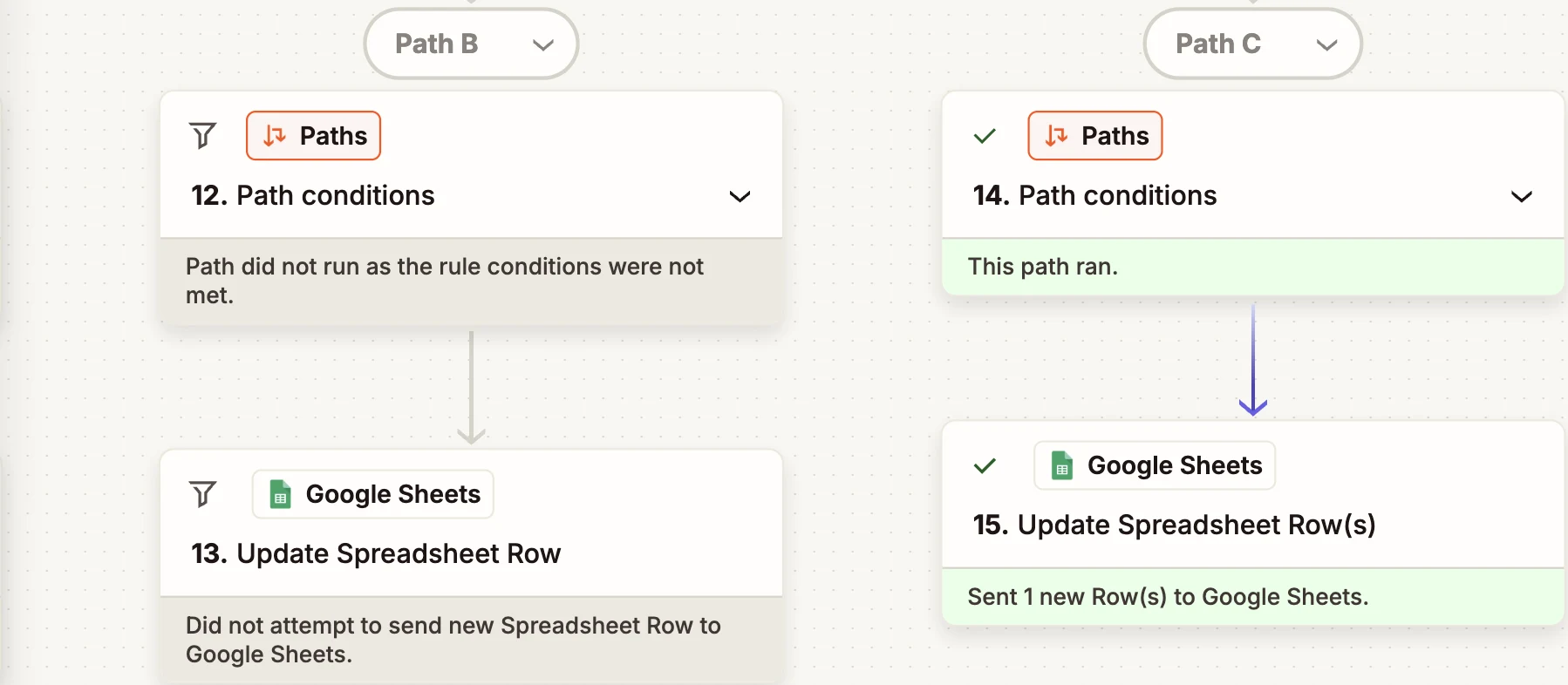
✓ Actual Zapier run history. The test lead took Path A (HOT) and was written back to the sheet; Paths B and C correctly did not run. Account details are hidden. Swipe the image to see all three paths.

A 100-point qualification model

Scores of 80 and above route HOT, 50 to 79 WARM and below 50 COLD. Those thresholds are fixed rules, not AI judgement. Four signals feed the score, each with a fixed ceiling. AI intent carries the most weight because the written problem says the most about fit, but it can never outvote the structured signals on its own.

SignalScored byMaxWeight
Service relevanceLookup table25
Automation interestLookup table15
BudgetLookup table25
AI intentAI by Zapier35
Total100

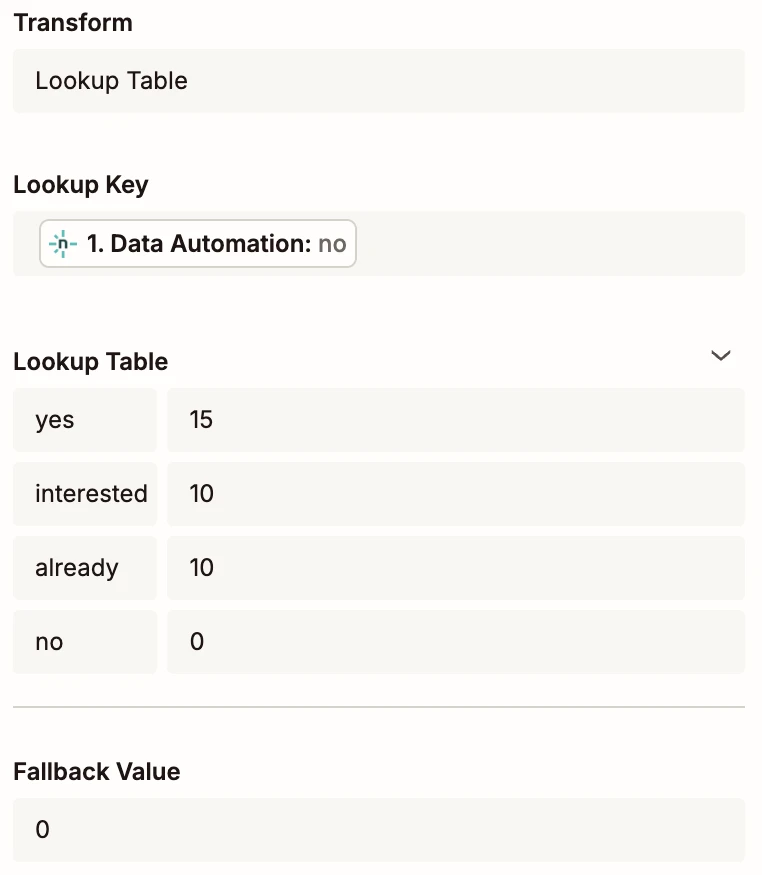
Automation interest, mapped to submitted values

Each lookup key is the exact value the form sends to Zapier, not the label a visitor reads. Getting this wrong was the biggest issue found in testing (see below).

Submitted valuePoints
yes15
interested10
already10
no0
Step 3 lookupCurrent configuration
Zapier lookup table keyed on submitted values: yes 15, interested 10, already 10, no 0, fallback 0
✓ Actual Zapier configuration.

AI handles the part rules can’t

A dropdown can tell you a budget. It can’t tell you whether the prospect understands their problem or how soon they need it solved. That is what the AI step reads for.

Problem statement from the test enquiry
“We receive around 300 leads every month, but our sales team currently qualifies them manually. We want to automate lead qualification and routing because the current process takes too much manual effort.”
AI intent score returned25 / 35

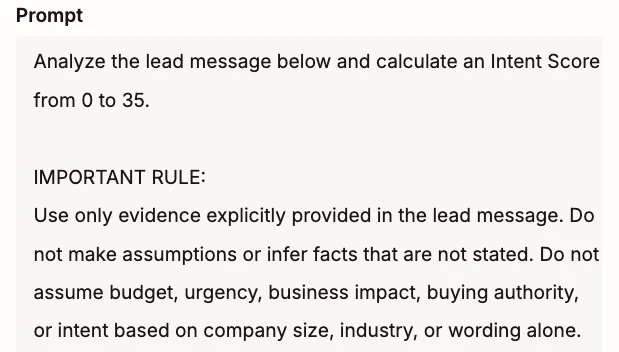
The prompt instructs the model to score only what the message states. It must not assume budget, authority, urgency or business impact the prospect didn’t mention. That is why urgency scored zero here: the message gives no timeline or deadline, so the model gave no points for it.

Step 7 promptExcerpt
Excerpt of the AI by Zapier prompt: use only evidence explicitly provided in the lead message and do not assume budget, urgency, business impact, buying authority or intent
✓ Actual prompt excerpt.

How the AI scored this enquiry

  • Problem clarity8 / 8

    States the problem precisely: 300 leads a month, qualified by hand.

  • Business impact4 / 7

    Describes the workload, but not what it costs in money or lost deals.

  • Solution intent8 / 8

    Explicitly wants to automate qualification and routing.

  • Urgency0 / 6

    No timeline, deadline or reason to act now.

  • Specificity5 / 6

    Gives scale, current process and desired outcome.

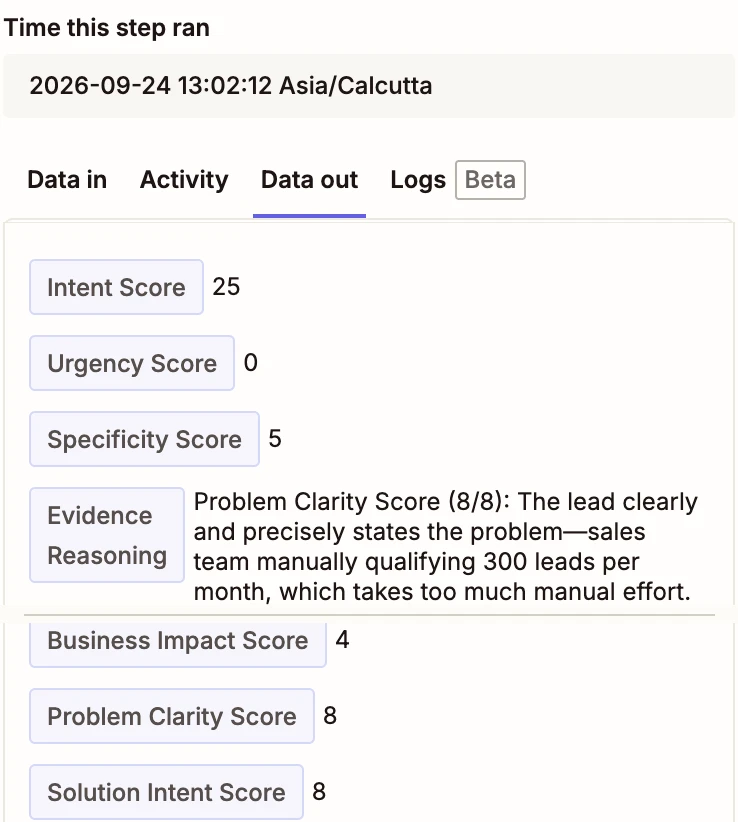
  • Intent score25 / 35
Step 7 outputAI by Zapier
AI by Zapier step output showing Intent Score 25, Urgency Score 0, Specificity Score 5, Business Impact Score 4, Problem Clarity Score 8, Solution Intent Score 8, with written evidence reasoning
✓ Actual AI by Zapier output. The model returns each factor score plus written reasoning for it, so every intent score can be checked. Two views of the same output panel, combined.

Tested across all three outcomes

A run that completes proves nothing about the decision it made. So we submitted three enquiries built to land in different tiers and checked the score, the path that ran and the record written back.

HOTPath A ran
85 / 100
“We receive around 300 leads every month, but our sales team currently qualifies them manually. We want to automate lead qualification and routing…”
  • Service ai-marketing-automation25
  • Interest yes15
  • Budget 3k-5k20
  • AI intent25
WARMPath B ran
68 / 100
“We get around 100 leads per month and our team currently qualifies them manually. We’re interested in automation but we’re still exploring how to get started.”
  • Service ai-marketing-automation25
  • Interest interested10
  • Budget 1k-3k15
  • AI intent18
COLDPath C ran
24 / 100
“We’re currently focused on improving our existing email campaigns. We’re not looking to automate our marketing processes right now.”
  • Service email-marketing10
  • Interest no0
  • Budget under-1k5
  • AI intent9

Messages and field values exactly as submitted by test enquiries. Contact details are hidden.

Google Sheets lead database with six test rows: 85 WARM, 70 WARM and 85 HOT from early testing, then 68 WARM, 69 WARM and 24 COLD
✓ Actual lead database. Rows 2–4 are the early test runs discussed in the lesson below. Rows 5–7 are the three-outcome tests, including a repeat run of the WARM lead. Contact fields redacted.
WARM leadPath B ran, A and C skipped
Zapier run history for the WARM test lead: Path B ran and updated the sheet; Paths A and C did not run
COLD leadPath C ran, B skipped
Zapier run history for the COLD test lead: Path C ran and updated the sheet; Path B did not run

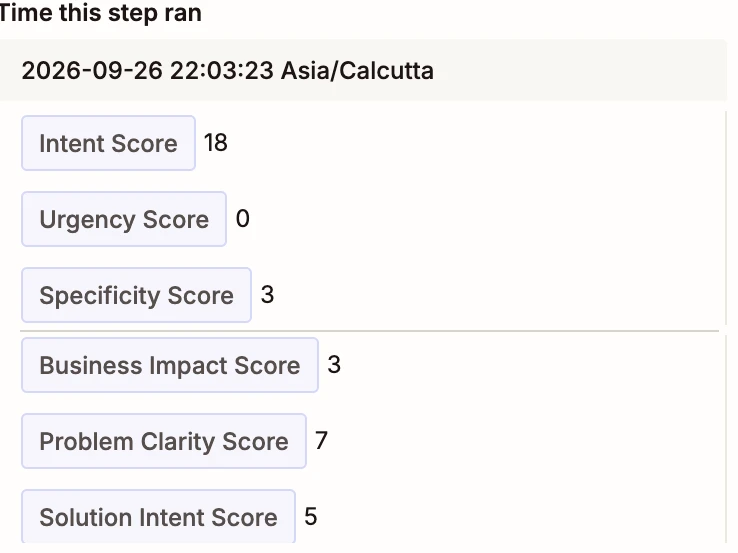
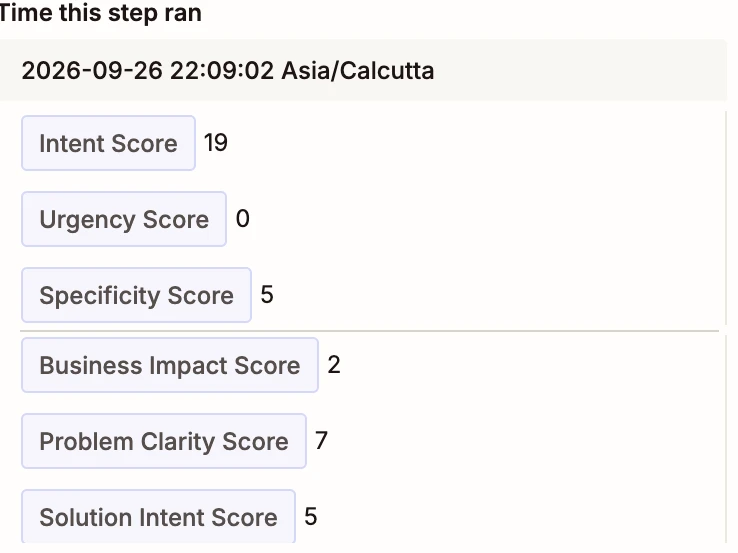
Same lead, run twice: 68, then 69

AI output isn’t guaranteed to be identical from one run to the next, so we submitted the WARM enquiry a second time to see how much the intent score would move, and whether it would change the decision.

AI factorRun 1Run 2
Problem clarity (of 8)77
Business impact (of 7)32
Solution intent (of 8)55
Urgency (of 6)00
Specificity (of 6)35
AI intent (of 35)1819
Rule-based points5050
Final score68 WARM69 WARM

Three factors held steady. Business impact dropped a point and specificity rose two, a net change of one point. The rule-based 50 didn’t move, and both runs routed to WARM.

The thresholds absorbed the variation here because 68 sits well inside the WARM band. A lead scoring 79 on one run and 80 on the next would flip to HOT. That is why human review for leads near a threshold is on the roadmap.

Run 1Intent 18
AI by Zapier output, first run: intent score 18, urgency 0, specificity 3, business impact 3, problem clarity 7, solution intent 5
Run 2Intent 19
AI by Zapier output, second run: intent score 19, urgency 0, specificity 5, business impact 2, problem clarity 7, solution intent 5

✓ Actual AI by Zapier output from both runs. Each combines two scroll positions of the same panel.

Every number, traced to the run

The HOT lead, followed through its Zapier run history. Every figure in its score comes from one of these steps.

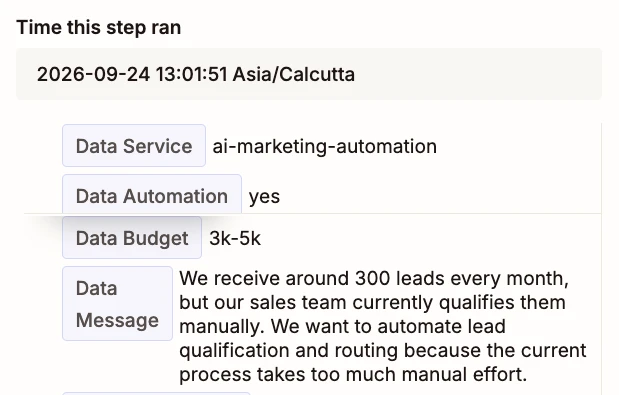
  1. Step 1

    The form submits yes

    Raw values as Netlify passed them to Zapier.

    Zapier step 1 output showing Data Service ai-marketing-automation, Data Automation yes, Data Budget 3k-5k and the lead message
  2. Step 3

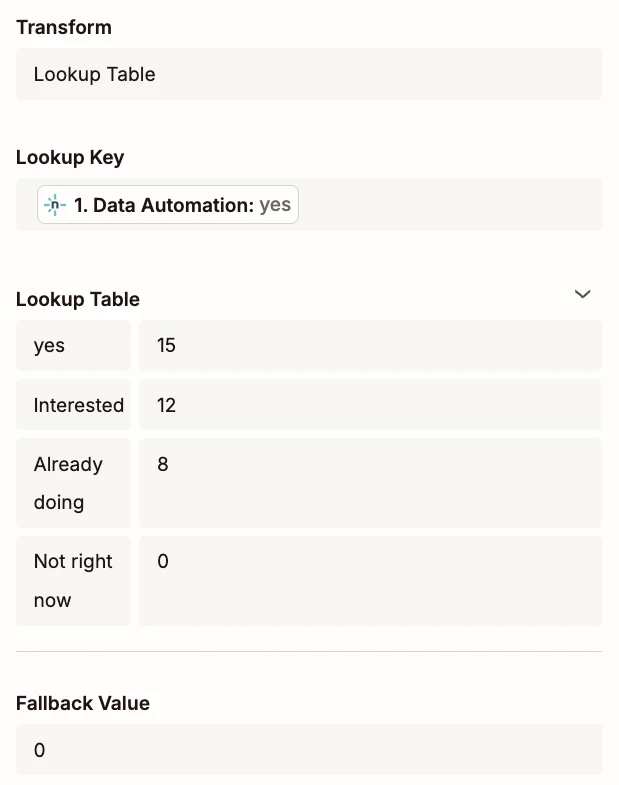
    The lookup awards 15 points

    The lookup as configured for this run. Anything unmatched falls back to 0; the other three keys were corrected later (see below).

    Zapier Formatter lookup table: yes 15, Interested 12, Already doing 8, Not right now 0, fallback value 0
  3. Step 8

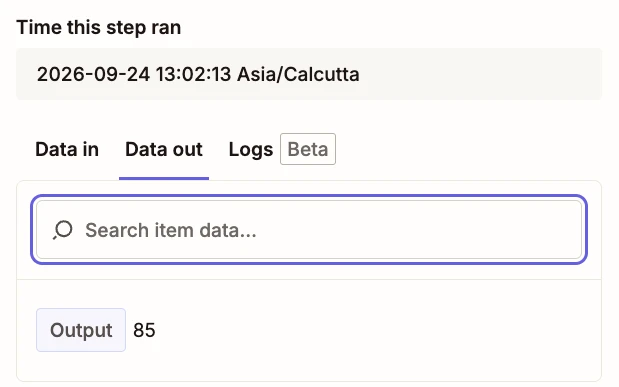
    The total comes to 85

    Rule scores plus the AI intent score of 25, summed.

    Zapier step 8 Formatter Numbers output showing 85
  4. Step 10

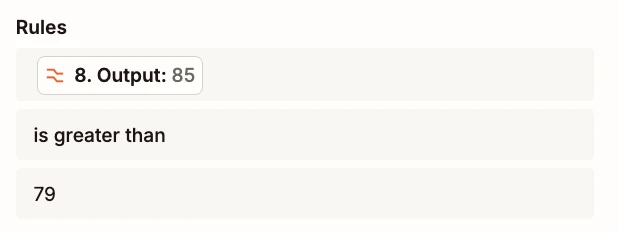
    Path A requires more than 79

    The HOT path only runs when the total is greater than 79.

    Zapier Path A rule: step 8 output 85 is greater than 79
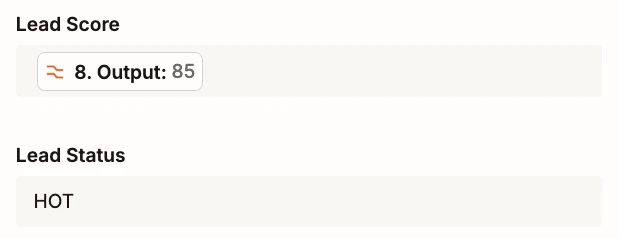
  5. Step 11

    The record is written as HOT

    Score and priority go back to the lead’s row in the database.

    Zapier step 11 Google Sheets update: Lead Score 85, Lead Status HOT

✓ Actual Zapier run history from the September 2026 test run. The AI step’s output is shown in the intent section above. Step 1 combines two scroll positions of the same panel.

Testing caught two bugs. Neither raised an error.

Both bugs produced data that looked valid, so nothing flagged them. They showed up only when we checked the scores written back to the lead database: rows 2 and 3 in the sheet above.

85WARM

Right score, wrong priority

The score was calculated correctly, but the routing wrote the wrong status to the record. An 85 should never be WARM. We corrected the routing so each path writes its own priority.

70WARM

A missing answer scored zero

The lookup was keyed on the labels visitors read (“Interested”, “Already doing”, “Not right now”) and had no entry for yes at all. The form actually submits yes, interested, already and no. With no match, Zapier used the fallback of 0, so the lead lost 15 points and dropped a tier. We rebuilt the table on the submitted values.

85HOT

After both fixes

The same enquiry scores 85 and routes to HOT, and the WARM and COLD tests above run on the corrected table.

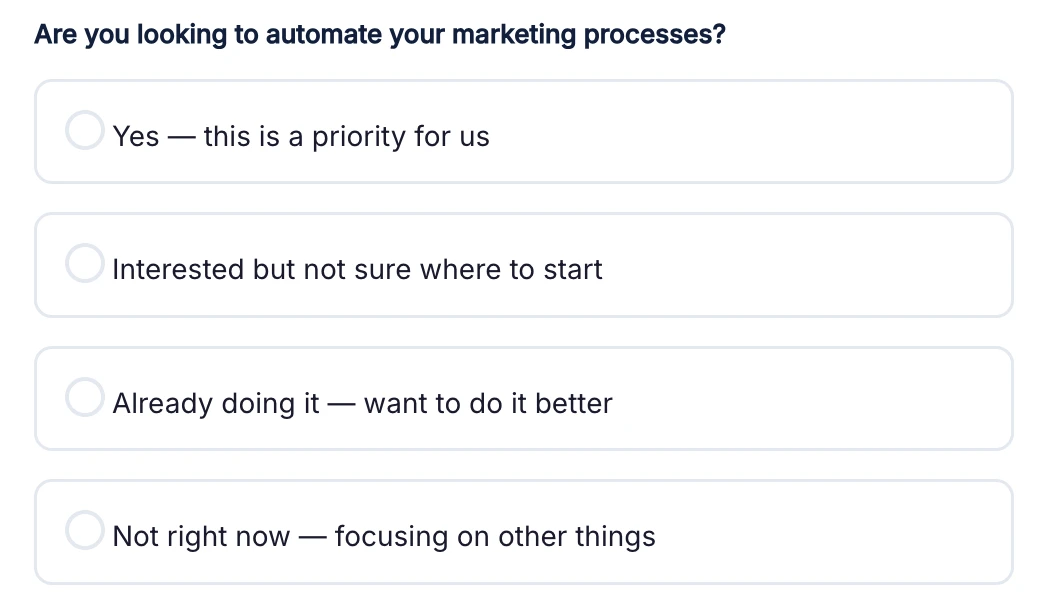
Form question: Are you looking to automate your marketing processes? Options: Yes, this is a priority for us; Interested but not sure where to start; Already doing it, want to do it better; Not right now, focusing on other things
What the visitor sees.
Visitor picksForm submitsOriginal keyPoints now
Yes — this is a priority for usyesmissing15
Interested but not sure where to startinterestedInterested10
Already doing it — want to do it betteralreadyAlready doing10
Not right now — focusing on other thingsnoNot right now0

What a visitor sees on a form is not what the automation receives. Inspect the real payload before writing a single rule, and check every test’s output, not just its run status.

What manual qualification is really costing you

This workflow has run on test enquiries, so there are no measured savings to report yet. What we can show is the size of the problem it’s built to remove. The model starts at 300 leads a month, the volume described in our HOT test enquiry. Change the numbers to match your team.

A manual review usually means reading the message, checking the company’s website or LinkedIn, judging fit and logging a status. Use your team’s fully loaded hourly cost, not just salary.

40hours a month
5.0working days a month
$1,600cost a month
$19,200cost a year, 480 hours

Estimates from the inputs above, not measured results from this build. The workflow takes over the triage of every lead; your team still reads and acts on the leads it ranks highest.

Shown in testing

Consistency

Every lead is scored against the same written rubric. When the same enquiry ran twice, the score moved by one point and stayed in the same tier.

Shown in testing

Speed

In the test runs, each lead was scored within about 30 seconds of the workflow picking it up, with no one waiting to get to the inbox. Why response speed matters

Opportunity cost

Time back for selling

The hours in the model are usually senior sales or marketing time. Every hour spent sorting enquiries is an hour not spent talking to the ones that will buy.

Measured next

Accuracy

Accuracy means HOT leads actually close more often than COLD ones. That needs real leads and closed deals, so it’s the first thing we track once the workflow goes live.

What’s built, and what comes next

The qualification engine is built and tested across all three outcomes. It has run on test enquiries, not yet on real lead volume. These are the steps that take it into production.

Built and tested

  • Form capture and lead record creation
  • Rule-based scoring for service, interest and budget, keyed on submitted values
  • AI intent analysis with a five-part rubric
  • 100-point total and HOT / WARM / COLD routing
  • Score and priority written back to the record
  • Tested on HOT, WARM and COLD leads, plus a repeat run for AI consistency

Next in the roadmap

  • CRM integration and sales notifications for HOT leads
  • Follow-up task creation and duplicate detection
  • Lead enrichment and source/campaign attribution
  • Human review for leads scoring near a threshold
  • Clean HTML-encoded characters (such as apostrophes) in stored messages
  • Validation against real historical leads, and outcome tracking
  • Feedback loop that tunes scoring against closed deals
Signals→Intelligence→Recommendation→Human approval→Action→Outcome→Learning

Lead scoring is the first layer. The same pattern extends to website, SEO, CRM, campaign and content signals, feeding one growth intelligence system with a person approving every consequential action.

Questions about AI lead scoring

What is AI lead qualification?

AI lead scoring, sometimes called AI lead qualification, uses a language model to read the unstructured parts of an enquiry, such as the problem a prospect describes, and turn them into a consistent score. In this workflow, AI handles only the free-text intent assessment (35 of 100 points); service, automation interest and budget are scored by fixed rules.

Why combine rules and AI instead of letting AI score the whole lead?

Structured fields like budget or service selection have known answers, so fixed rules score them predictably and cheaply. AI is used where rules break down: interpreting what a prospect actually wrote. Keeping AI to one bounded part of the score makes results easier to audit and explain to a sales team.

Can this workflow be built in n8n or Make instead of Zapier?

Yes. The logic is a trigger, lookup-based scoring, one AI step, a sum and conditional routing. All three platforms support that pattern. Zapier suited this build because the form, spreadsheet and AI steps were available as native steps; teams with high volumes or self-hosting needs may prefer n8n.

What do you need before building AI lead scoring?

A form with consistent field values, an agreed definition of a good lead, and a place to write results back, such as a spreadsheet or CRM. The most common failure point is data mapping: every value the form can submit needs a matching entry in the scoring rules, or it silently scores zero.

Does the AI give the same score every time?

Not always. When the same test enquiry was submitted twice, the AI intent score was 18 and then 19, so the final score moved from 68 to 69 and both runs stayed WARM. Small variation is normal for language models, which is why the final decision uses fixed thresholds, and why leads scoring close to a threshold should be reviewed by a person.

Does the AI make the final decision on a lead?

No. The AI contributes an intent score within a fixed range. The final score, the HOT, WARM and COLD thresholds and the routing are all deterministic, and sales still decides what to do with each lead.
Want AI lead scoring for your own pipeline?

Tell us how leads reach you today. We’ll map what scoring and routing would look like for your team, in Zapier, Make or n8n, and tell you honestly if you don’t need it yet.

AI-powered workflows. Human judgement at every decision point.

Next case study
CodesClue Technologies — 10× Organic Traffic in 6 Months
Read next →
We use cookies to understand how visitors use this site. Analytics cookies stay off unless you say yes — see our Cookie Policy for details.

Cookie Preferences

Strictly Necessary
Required for the site to function. Always on, cannot be disabled.
Analytics
Helps us understand how visitors use the site (Google Analytics). Off by default.